
Why Naming and Identity Shape Guest Behaviour

Lesson: Why Naming and Identity Shape Guest Behaviour
Introduction
Your Airbnb hosting identity is the name that sits above all your listings, and it becomes your email address. If you might ever own more than one property, choose a broad personal name plus a plural word, such as Scott's Holiday Rentals, and keep locations and property types like Beach or City in the listing names instead.
⚡ THE 5-MINUTE VERSION
Before photos or pricing, your Airbnb needs an identity: a name that sits above your listings and a hosting Gmail that everything is built on. Get it personal and consistent, and guests feel hosted, not managed.
Why this matters
Your hosting name and email appear everywhere: as the login for OwnerRez, PriceLabs and Hostfully, as the account on Airbnb, Booking.com, Vrbo and Google, and as the sender of every guest message. Guests absorb who a message is from, not just what it says. When they feel there’s a real person behind the stay, they’re more patient, more forgiving and kinder in reviews. When it feels like “a company”, small issues become service failures and reviews get harsher.
Decide first: one property, or more?
The name you choose becomes your email address, and every platform gets tied to it, so changing it later means moving every account. If you’ll only ever have one property, the identity can be specific to it. If you might grow, make it broad: a personal anchor plus a general plural word, with no location or property type, for example Scott’s Holiday Rentals, with listings like Skye’s Beach House and Skye’s City Apartment underneath. Not sure? Go broad: a broad name works for one property, but a specific one never works for two. We learnt this ourselves: our Gmail is named after Skye’s Beach House, and it’s the one thing we’d change.
The four rules
1. Never tell guests how they should feel. Leave out luxury, luxe, premium, exclusive, elite and high-end. Luxury is relative: the moment you use the word, guests measure you against their own home instead of the market. Let the photos and the stay do the convincing.
2. Personalise it, don’t corporate-ise it. Anchor it to a human: your name, a family name, even a pet. And have a real one-sentence story. Skye’s Beach House is named after Skye, my dog, and that simple answer always gets a smile.
3. Use a personal plural. A singular name feels intimate but small; an impersonal plural (“Holiday Stays Co.”) feels faceless. A person plus a plural word (Holiday Rentals, Stays, Getaways, Escapes, Retreats) feels both established and human.
4. Keep the layers consistent. We recommend Option 3, hierarchical consistency: Scott is the human on the host profile, Scott’s Holiday Rentals is the system, and Skye’s Beach House is the place. Option 1 puts your name on everything, so guests feel they’re in your house. Option 2 (a property-led identity like Skye’s Holiday Stays) is acceptable, but guests juggle three names. Options 1 and 3 share the same hosting identity; the difference is what the listings are called.
Good and bad names
“Luxe Coastal Escapes” has an expectation word, no person and is locked to the coast: Mia’s Getaways is better. “Sydney Short Stay Management” is corporate and locked to one city: try The Nguyen Family Holiday Homes. “Bookings4U2026” looks like spam. “Skye’s Holiday Rentals” is acceptable (Option 2) because it’s a real story, but Skye isn’t you, so guests juggle two names; Scott’s Holiday Rentals with Skye’s Beach House as the listing is better. Say it out loud: “Hi, it’s Scott from Scott’s Holiday Rentals.” If it sounds natural, you’re close.
How to do it
Choose the name first and run the five checks: no expectation words, a real personal anchor, a plural word, the Option 3 hierarchy, and it passes the “one property, or more?” decision. Check the website address and social handles too. In Australia, trading under a name that isn’t your own usually means registering a business name: search registered names on ABN Lookup and check with your accountant. Then create a brand-new Gmail just for hosting:
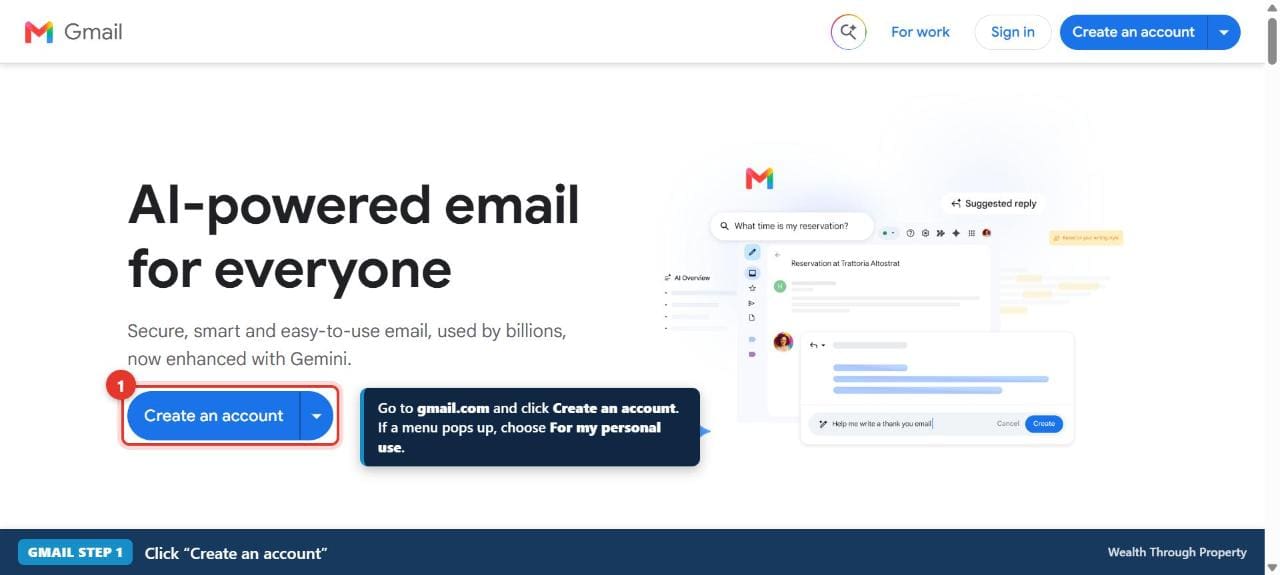
- Go to gmail.com and click Create an account (top right). If asked, choose For my personal use.
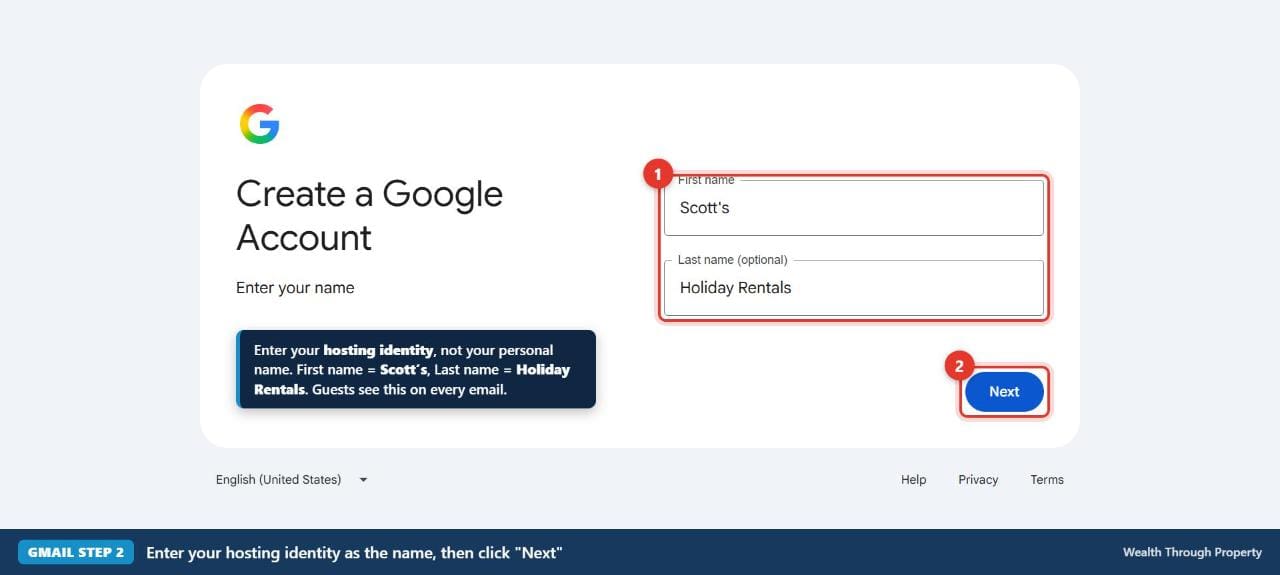
- Put your hosting identity in First name and Last name (“Scott’s” + “Holiday Rentals”). This is the sender name guests see.
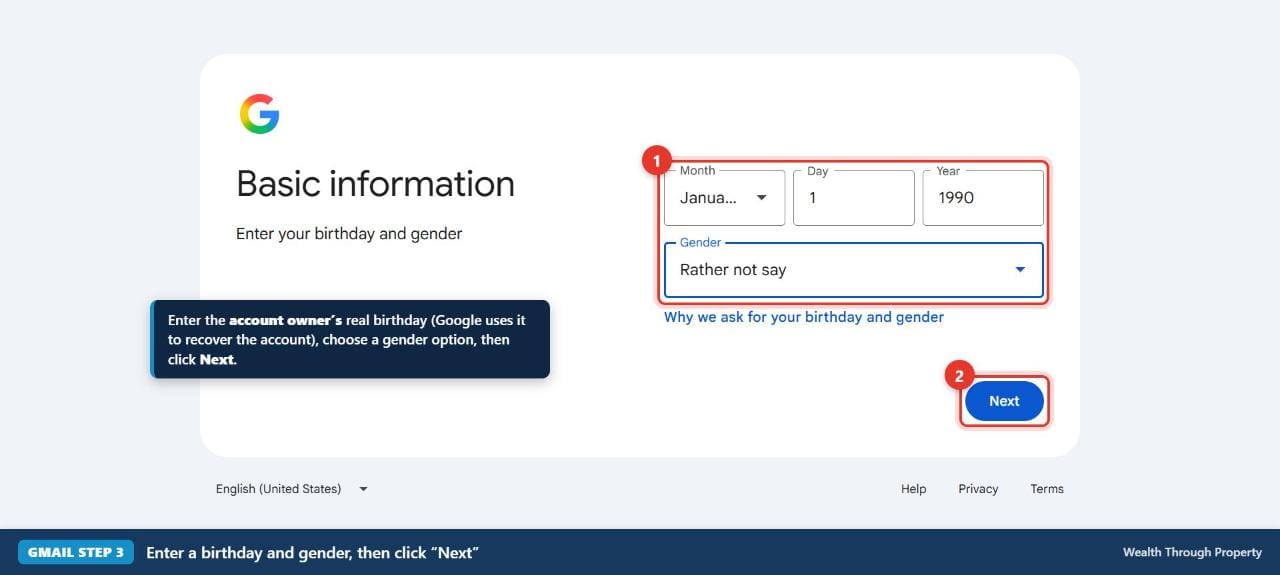
- Enter your real date of birth (it matters for account recovery). For gender you can choose Rather not say. Click Next.
- Pick the suggested address if it matches your identity, or choose Create your own Gmail address. If it’s taken, add .stays or .bookings, never random numbers.
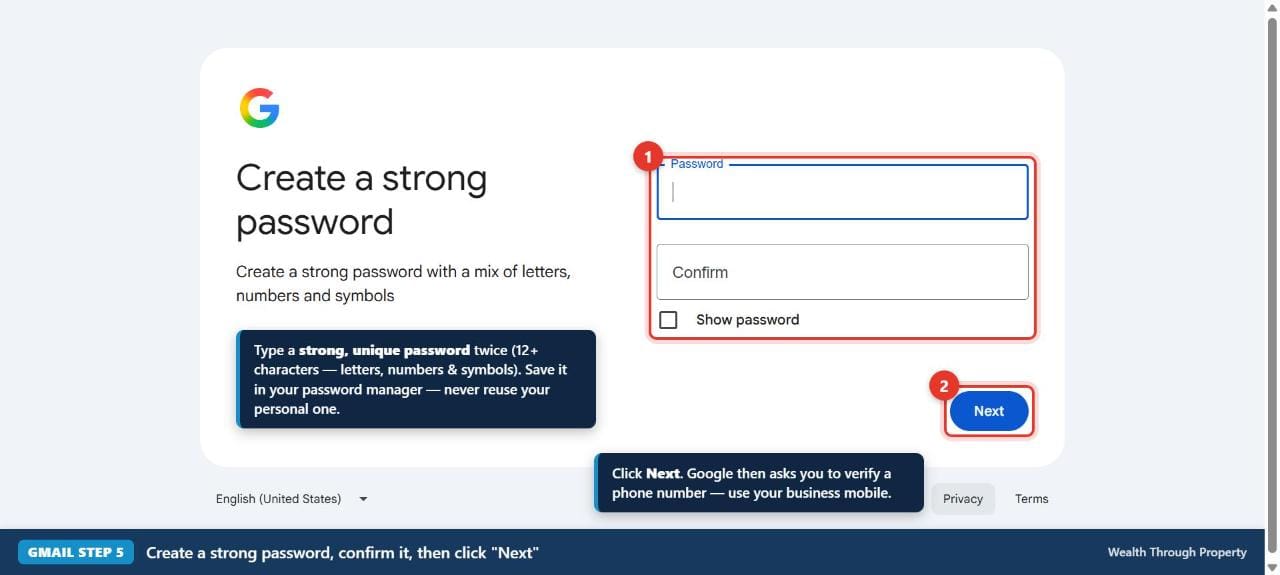
- Create a strong password you haven’t used anywhere else and save it in a password manager.
- Add the mobile you’ll keep for hosting if Google asks (it’s optional, but we recommend it) and a recovery email, then agree to Google’s terms. You should now see your new, empty inbox.
- Add the account to the Gmail app on your phone, add a friendly profile photo, and turn on 2-Step Verification: myaccount.google.com → Security & sign-in → Turn on 2-Step Verification. Use the account for hosting only.
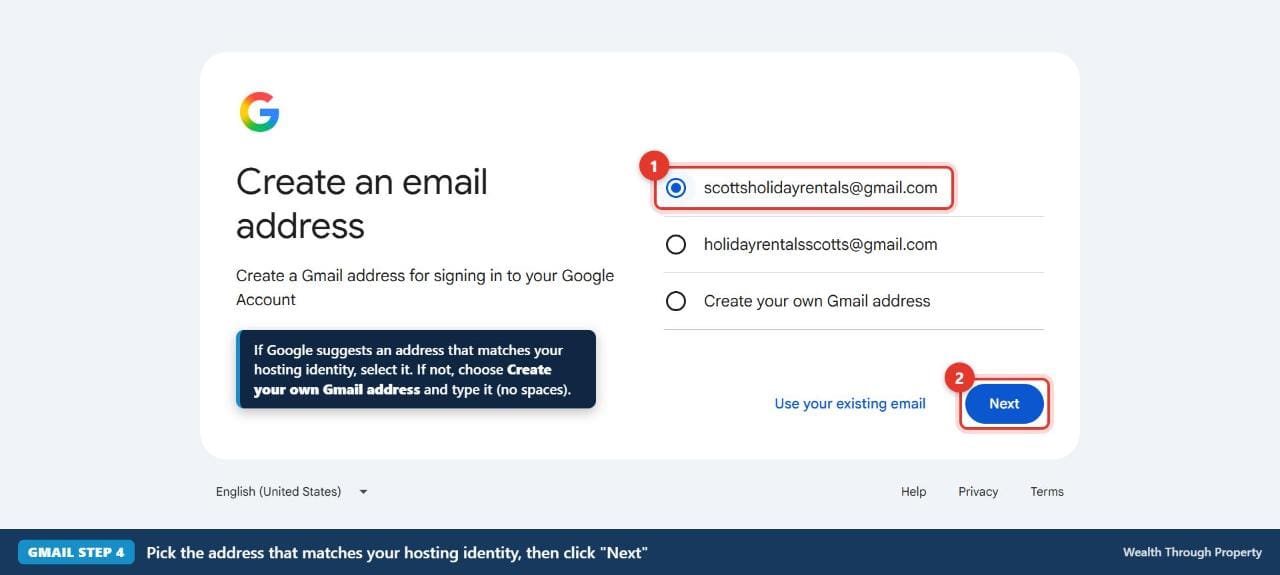
Step 4: pick the suggested address if it matches your hosting identity, or create your own.
Then use the new Gmail everywhere: Airbnb (Module 11, Listing Setup: Airbnb, or change it in your Airbnb account settings now), Booking.com and Vrbo (Module 11), OwnerRez (Module 6), PriceLabs (Module 8), Hostfully (Module 9), Google Business Profile (Module 13) and your cleaner and trades contacts (Module 5).
Course sign-in: you sign in to this course with your Stripe payment email or your PriceLabs email. If you change your PriceLabs email, keep signing in with your Stripe email, or message us your new email so we can update your access.
Common mistakes
Using your personal email, so every booking and password reset lands in your private inbox and you can’t hand access to a team. Sharing your Gmail password with cleaners or helpers instead of giving them their own access in OwnerRez and the platforms. And skipping 2-Step Verification: if this one account is compromised, every platform connected to it is too.
What to do next
We require this step because revenue management and support rely on clean access and clear ownership. Using the revenue management included with your course? Book your setup Zoom. Already a client? WhatsApp us your hosting name and Gmail. Not using revenue management? Still complete this step and carry on with the course.
✅ Do this now (30 minutes)
- Decide first: one property forever, or more? Then choose your hosting identity using Option 3 (personal anchor + plural word, no “luxury” words).
- Write down the one-sentence story behind the name. Guests will ask.
- Run the five checks and the availability checks.
- Create your hosting Gmail using the 7 steps above and save the password in a password manager.
- Add the account to the Gmail app on your phone and turn on 2-Step Verification.
- Already a client? WhatsApp us your hosting name and Gmail. Using the revenue management included with your course? Book your setup Zoom.
Before we touch photos, pricing or descriptions, your Airbnb needs a proper identity: a name that sits above your listings and an email address that everything else is built on. In this lesson you’ll learn why the right name changes how guests behave, choose yours using four simple rules, and create your hosting Gmail step by step.
IN THIS LESSON
- Why we start with your hosting identity
- Decide this first: one property, or more?
- Why this matters: psychological presence, not “admin”
- Where your hosting identity is used
- Rule 1: never tell guests how they should feel
- Rule 2: personalise it, don’t corporate-ise it
- Rule 3: singular vs plural names
- Rule 4: consistency creates trust (the three structures)
- Good names vs bad names: worked examples
- Your turn: create your hosting identity and Gmail
- Connect everything to your new identity
- Why we require this step, and what to do next
- Check your work and do this now
Why We Start With Your Hosting Identity
This is the first hands-on step of the course, and that’s deliberate. We’re not starting with styling tips, pricing hacks or platform tricks. We’re starting with foundations, because everything that follows is built on structure, clarity and repeatable systems.
This lesson isn’t about naming one specific property, and it isn’t about creating a “business” in the corporate sense. It’s about naming your Airbnb presence: the identity your properties sit under, even if you only have one property right now. The moment you host, you are already running something bigger than a single listing.
Decide This First: One Property, or More?
Make this one decision before you choose a name, because it affects everything else. The name you choose becomes your email address, and that email stays with you. Every platform, tool and guest message gets tied to it. Changing it later means moving every account.
So ask yourself honestly:
- Am I only ever going to have this one property?
- Or might I buy (or manage) more properties in the future?
FROM SCOTT
“I use Skye’s Beach House, and I’m never going to be able to buy a city property and use that email, because it’s just not going to work. If I’d used, say, Scott’s Holiday Rentals, with Skye’s Beach House or Scott’s Beach House as the listing name, it would have been a lot better.”
Only ever one property? Your hosting identity (and email) can be specific to that property, for example Skye’s Beach House.
More than one property, or you might grow one day? Make it broad: a personal anchor plus a general plural word, with no location and no property type. For example, Scott’s Holiday Rentals (scottsholidayrentals@gmail.com), with listings like Skye’s Beach House and Skye’s City Apartment underneath.
Watch out: Not sure? Choose the broad option. A broad name works perfectly for one property. A specific name never works for two. If there’s any chance you’ll grow, keep words like Beach, Coastal, City, Bay, Harbour, Mountain, Cottage, Villa, Apartment or a suburb name out of your hosting identity. Put them in your listing names instead.
Why This Matters: Psychological Presence, Not “Admin”
One of the biggest mistakes hosts make is thinking professionalism and personality sit at opposite ends of a scale: the more “professional” you become, the more warmth you lose. That simply isn’t true. The highest-performing short-term rentals sit in a narrow middle ground: they feel personal, but they behave professionally.
Everything that follows in this course (messaging systems, automations, review requests, check-in instructions, house manuals) increases the number of touchpoints between you and your guests. Those touchpoints don’t just deliver information. They create presence, and presence is psychological. Every time a guest reads a message or looks for help, they’re quietly asking: “Who am I dealing with? Is this a real person who has this under control?”
This is where many hosts, and almost all traditional property managers, get it wrong. They optimise for process and forget perception. They become efficient but cold, structured but faceless. Guests feel managed instead of hosted. And the moment a guest feels they’re dealing with “a company” instead of “a person who runs a place”, patience drops, reviews get harsher and small issues feel bigger than they are.
What we’re aiming for instead is professional clarity wrapped in a human identity.
Where Your Hosting Identity Is Used
This isn’t theoretical. Once you choose a hosting name and create its email, that pair is used everywhere:
- Tools and portals. It’s the login for OwnerRez, PriceLabs, Hostfully and every other tool. Everything sits above your personal inbox, so it’s clean, separate and easy to hand access to a team.
- Every booking platform. It’s the account email for Airbnb, Booking.com, Vrbo, Google and others, so access, permissions and notifications stay consistent and nothing fragments.
- Guest messages. It’s the sender name on automated emails, system messages, direct and Google enquiries, and fallback emails when a platform hides guest details. Guests absorb who a message is from, not just what it says.
- Guest support. It’s the name guests associate with help and responsibility. If it feels organised but human, guests feel safe reaching out early, before small problems grow.
Guests don’t think, “This host has good systems.” They feel, “Someone has this under control.” Guests who feel looked after are more patient, more communicative and more forgiving when small issues arise. But if your email is personal, your platform names don’t match and your tone shifts from message to message, guests feel friction even if they can’t say why. When the same identity appears everywhere, the experience feels calm and cohesive.
Now that you know where the identity shows up, the next step is understanding how dangerous the wrong wording can be. At this level you’re not just choosing a name. You’re shaping expectations before a guest ever steps inside.
Rule 1: Never Tell Guests How They Should Feel
Words like luxe, luxury, premium, elite, exclusive or high-end feel safe to hosts because they sound successful. Psychologically, they’re some of the most volatile words you can use, especially in the identity behind all your emails and messages.
Luxury isn’t an objective standard. It’s a relative experience. To you, luxury might mean the time you spent, the modern look, the $5,000 dining table. To you, that price signals quality. But guests don’t experience cost. They experience perception. A guest can look at that same table and think it looks cheap, dated or just not their taste. They don’t see the receipt. They judge what’s in front of them against their own reference point, and that reference point is almost always their own home.
There’s always someone with more money than you, someone whose home is better than yours, someone whose baseline is higher than anything you can offer. Unless you’re genuinely operating and spending at the very top of the market, you’re almost never competing at the top of a guest’s expectations.
This is made worse by property bias. You’re emotionally invested. You made the decisions, you know the compromises and you remember choosing the upgrade over the cheaper option. Guests don’t share any of that context. They only see the outcome, and they judge it quickly, comparatively and without attachment.
So expectation words don’t belong in your hosting identity. They don’t protect you or elevate you. They make the guest’s own life the benchmark. The moment you label something “luxury”, you stop being measured against the market and start being measured against the guest’s life, and that’s a standard you can never control. Let the property, the photos and the reality do the convincing.
Tip: This is the expectation-disconfirmation effect in action: satisfaction depends on the gap between what people expected and what they got. Set the expectation honestly and let the stay beat it.
Rule 2: Personalise It, Don’t Corporate-ise It
Your hosting identity must feel personal: not branded, not corporate, not like a property management company. Personal doesn’t mean over-sharing or being casual. It means anchoring the experience to a human. That’s why some of the strongest identities come from very simple places: your own name, a family name, a child’s name or even a pet’s name.
That isn’t sentimental. It’s psychological. When a guest sees a personal identity, their brain files the stay differently: it belongs to someone. Guests become more patient when small things go wrong, more reasonable when asking for changes and far more forgiving in reviews.
The opposite is also true. The moment a stay feels corporate, guests stop behaving like guests and start behaving like customers. A late cleaner isn’t “one of those things”, it’s a service failure. A minor issue isn’t something to work through, it’s something to be compensated for. Guests are less forgiving with refunds, harsher in reviews and quicker to escalate when they think they’re dealing with a business instead of a person.
Your name needs a real story
At some point a guest will ask, “Why is it called that?” If your answer is “we just made it up”, something subtle breaks. The name loses its weight, because the guest realises it was manufactured, not owned.
Compare that to a simple, real answer. My property is called Skye’s Beach House because Skye is my dog. That’s it. There’s nothing clever about it. But when you tell a guest, they smile. They relate to it, even if they don’t have a dog. The name stops being a label and becomes a small human story, and human stories build trust faster than polished explanations.
Property managers lose goodwill not because they run systems, but because they erase ownership. Your hosting identity is the first place ownership shows up. Guests who feel hosted will work with you. Guests who feel managed will work against you.
Rule 3: Singular vs Plural Names
Once your identity is personal, the next decision is subtler: singular or plural? It isn’t just grammar. It changes how quickly guests trust you. A singular name feels intimate. A plural name feels established. And you don’t have to choose between personal and professional.
Singular (e.g. Alex’s Harbour House) feels human and intimate: one place run by one person. It triggers personal trust, because it feels like someone, not something. The weak spot: it can feel new and small, so trust builds slowly.
Impersonal plural (e.g. Holiday Stays Co.) feels structured but faceless. It only triggers institutional trust, so guests judge it like a company: less empathy and faster escalation.
Personal plural (e.g. Alex’s Holiday Stays) feels established and human. It triggers both kinds of trust: things are set up properly, and a real person cares. It has very few weak spots, which is why we recommend it.
People judge organisations more harshly than individuals. They extend empathy to people and enforce standards on companies. You see it on Airbnb all the time: individual hosts with one or two properties often hold higher review averages than big operators, not because their properties are better but because guests read problems as human errors rather than service failures. As portfolios scale and identities go generic, the language gets templated, responsibility feels distant and averages drift, from 4.9 to 4.7 to 4.6, not because quality collapsed but because perception did.
That’s why a plural name must never exist without a person in it. The plural word signals professionalism; the name restores human accountability. A professional without personality creates distance. Personality without structure creates doubt. A personalised plural identity is where the two meet, and it matters most when you’re starting out, before years of reviews are doing the work for you.
Tip: Good plural words: Holiday Rentals, Stays, Holiday Stays, Getaways, Escapes, Retreats, Holiday Homes. Pair one with your personal anchor: Mia’s Getaways, The Nguyen Family Holiday Homes, Scott’s Holiday Rentals.
Rule 4: Consistency Creates Trust (the Three Structures)
The last rule decides how guests feel throughout the stay: where each part of your identity sits. People feel calmer and more trusting when responsibility, ownership and intent are easy to understand (psychologists call this cognitive fluency and attribution). When identity is unclear or overloaded, guests feel tension. When it’s clean, they relax.
There are three common structures. All of them work mechanically. They don’t work equally well psychologically.
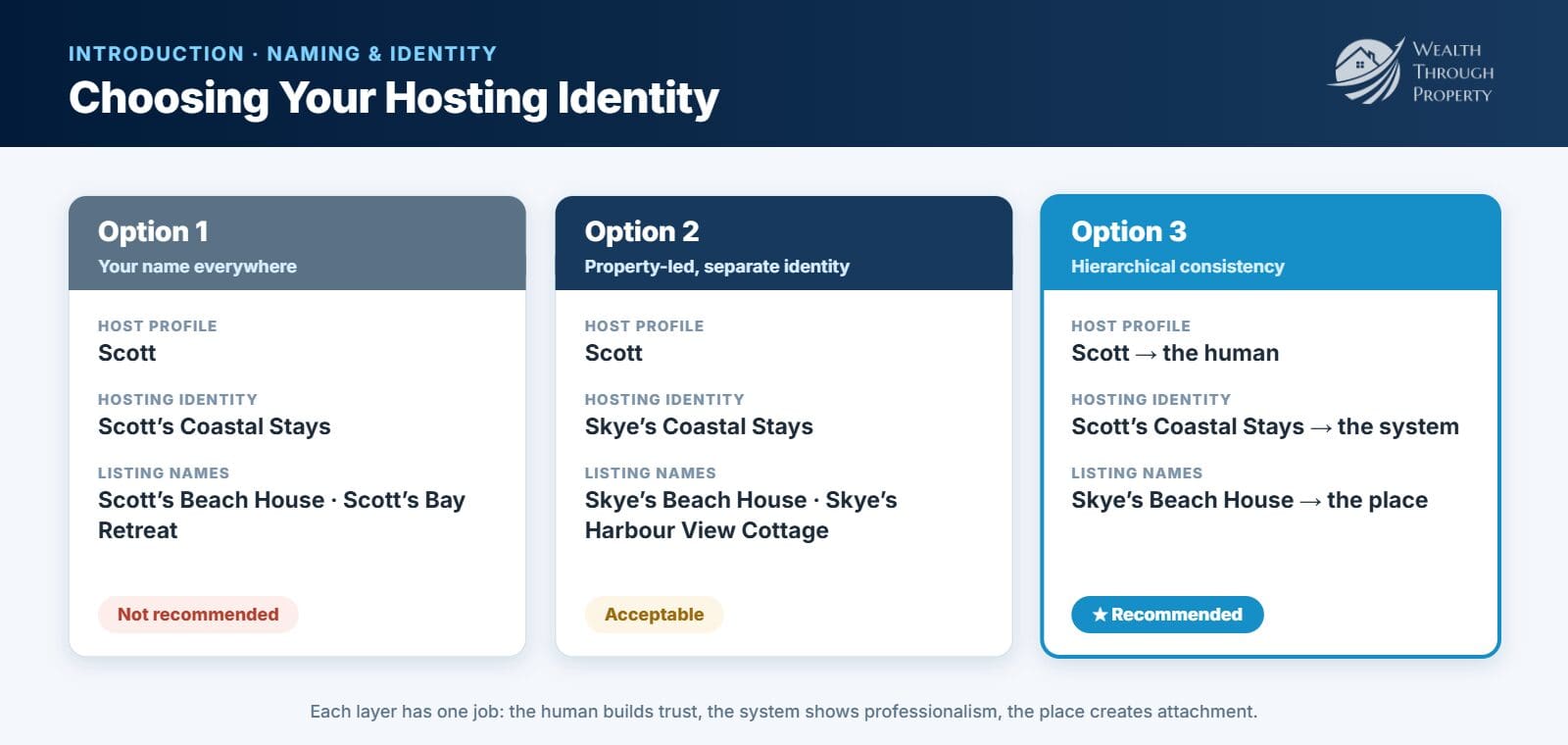
| Option 1: your name everywhere | Option 2: property-led, separate identity | Option 3: hierarchical consistency ✅ | |
|---|---|---|---|
| Host profile on the platforms | Scott | Scott | Scott |
| Hosting identity | Scott’s Holiday Rentals | Skye’s Holiday Stays | Scott’s Holiday Rentals |
| Listing names | Scott’s Beach House, Scott’s Bay Retreat | Skye’s Beach House, Skye’s Harbour View Cottage | Skye’s Beach House, Skye’s City Apartment |
| How guests feel | “I’m staying in Scott’s house” | Comfortable, but juggling three names | “This is our place for the stay, there’s a real person behind it, and it’s professionally run” |
| Our verdict | Works, not recommended | Acceptable, not preferred | Recommended |
Options 1 and 3 share the same hosting identity; the difference is what the listings are called.
Option 1: your name everywhere (works, but not recommended)
Ownership is crystal clear, but clarity isn’t the same as comfort. Environmental psychology shows people relax more deeply when they feel a sense of temporary ownership of a space. Guests know they’re renting, but emotionally they want to feel “this is where we’re staying”, not “we’re in someone else’s house”. When the host’s name is on every layer, the space feels occupied rather than theirs. Research on territoriality shows people behave more cautiously, and tolerate less, when they feel they’re in someone else’s domain. It also makes the stay host-centred instead of guest-centred, which grates most on longer and higher-paying stays.
Option 2: property-led with a separate identity (acceptable)
A clear improvement. The property becomes the emotional anchor (“we’re staying at Skye’s Beach House”), while messages come from Scott. Guests know who’s responsible without feeling they’re in his personal space. The catch is a split identity: guests process Skye (the property naming), Scott (the host) and Skye’s Holiday Stays (the system). It isn’t confusing, but it takes a little more mental stitching. Guests trust it; they don’t instantly absorb it.
Option 3: hierarchical consistency (recommended)
Each layer has one job, and none of them compete:
- Scott = the human: accountability, communication, trust.
- Scott’s Holiday Rentals = the system: competence, professionalism, structure.
- Skye’s Beach House = the place: emotional attachment, comfort, memory.
This matches how the brain likes to organise responsibility. Behavioural psychologists call it schema alignment: information that fits a familiar mental model is processed faster and judged more kindly. The property still feels like a place, not Scott’s home, so guests settle in faster and are less defensive when something small goes wrong, while Scott’s name appears often enough that personal trust is never lost. It preserves empathy while still letting you scale.
The principle to lock in
You are not naming things for yourself. You are structuring identity for guest psychology. Option 1 centres the host too much. Option 2 works, but needs more mental stitching. Option 3 matches how guests think, feel and judge, and it’s the structure we build the rest of this course on.
Good Names vs Bad Names: Worked Examples
Here’s how the four rules play out on real-sounding names. These are made-up examples to show the thinking. Each one reads: name → what’s wrong → a better version.
- Luxe Coastal Escapes → an expectation word (“Luxe”), no person, and locked to the coast → Mia’s Getaways
- Sydney Short Stay Management → corporate, no person, and locked to one city → The Nguyen Family Holiday Homes
- Scott’s Beach House as the hosting identity, with plans to grow → fine for one listing, but it breaks the moment you buy a city apartment → Scott’s Holiday Rentals, with Skye’s Beach House as the listing name
- Bookings4U2026 → numbers, no story, and it looks like spam in an inbox → Jack’s Holiday Stays
- Premium Stays by JP → an expectation word, and initials feel like a company → James’s Holiday Rentals
- Skye’s Holiday Rentals → acceptable (Option 2): it’s a real story, but Skye is my dog, not me, so guests juggle two names (Skye on the identity, Scott in the messages) → Scott’s Holiday Rentals, with Skye’s Beach House as the listing
Tip: Say it out loud as if you’re answering the phone: “Hi, it’s Scott from Scott’s Holiday Rentals.” If it sounds natural and you’d be happy hearing a guest say it, you’re close.
Your Turn: Create Your Hosting Identity and Gmail
Do it in this order: choose the name first, check it, then create the email. The Gmail address is built from your hosting identity.
1. Fill in your hosting identity worksheet
Write your answer to each line on paper or in your notes app (this page doesn’t save typed answers). The examples follow Option 3.
- Host profile on Airbnb / Booking.com: your real first name, the human guests talk to. Example: Scott.
- Hosting identity: a personal anchor plus a plural word. No “luxury”, “premium” or “elite”. Example: Scott’s Holiday Rentals.
- Listing names: a personal anchor plus the place, which is what guests say they stayed at. Example: Skye’s Beach House.
- The story behind the name: one honest sentence you can tell a guest who asks. Example: “Skye is my dog.”
- Gmail address: your hosting identity with no spaces (Step 4 below covers what to do if it’s taken). Example: scottsholidayrentals@gmail.com.
2. Run the five checks
- No expectation words (luxury, luxe, premium, exclusive, elite, high-end).
- Has a real personal anchor you can explain in one sentence.
- Uses a plural word (Holiday Rentals, Stays, Getaways, Escapes, Retreats) so it reads as established.
- Fits the Option 3 hierarchy: you → your hosting identity → the place.
- Passes the “one property, or more?” decision above.
3. Check the name is available
Five minutes now saves a painful rename later.
- Gmail: you’ll find out in Step 4 below.
- Website address: search the name at any domain seller to see if the .com.au or .com is free. You don’t have to buy it today, but it helps for direct bookings later (Module 13).
- Social handles: check Instagram and Facebook for the same name.
- Business name: in Australia, trading under a name that isn’t your own personal name usually means registering it as a business name. Search registered business names on ABN Lookup, and check with your accountant what applies to you.
4. Create your hosting Gmail, step by step
Create a brand-new Gmail account just for hosting. Don’t use your personal inbox. Go to gmail.com and click Create an account (top right), then follow the steps below. The screenshots use sample details; enter your own.
Start a new Google account
Go to gmail.com and click Create an account (top right). If Google asks who the account is for, choose For my personal use. This gives you a free Gmail address. You don’t need paid Google Workspace for this course.
Enter your hosting identity as the name
Put the first part of your hosting identity in First name and the rest in Last name (e.g. “Scott’s” + “Holiday Rentals”). This is the sender name guests see on every email, so don’t enter your personal full name here.
Add your basic information
Enter your real date of birth (Google uses it to verify the account if you’re ever locked out). For gender you can choose Rather not say. Click Next.
Create your own Gmail address
Google usually suggests a few addresses. If one matches your hosting identity exactly (e.g. scottsholidayrentals@gmail.com), select it. If not, choose Create your own Gmail address and type your hosting identity with no spaces. If it’s taken, add .stays or .bookings. Don’t use random numbers or your personal name.
Create a strong password
Use a password you haven’t used anywhere else: at least 12 characters, with letters, numbers and symbols. Save it in a password manager. Every booking platform and tool will sit behind this account.
Add your phone and recovery details, then finish
The last few screens protect the account. Google may word them slightly differently for you; the order is what matters.
- Phone number. If Google asks for one, enter the mobile number you’ll keep long-term for hosting, then type in the code Google sends by SMS. Google treats this step as optional, but we recommend it: it’s the fastest way back in if you’re ever locked out.
- Recovery email. If asked, add a recovery email. Your personal email is fine here.
- Finish. Check the details Google shows you, then agree to Google’s Privacy and Terms to create the account.
You should now see: your new, empty Gmail inbox, with your hosting identity as the account name.
Set the account up properly
Do these four things straight away, while you’re still signed in.
- Add it to your phone. Open the Gmail app on your phone and add this account (if you already use the app for another Gmail, add it as a second account). Now guest and platform emails reach you straight away.
- Add a profile photo. A friendly photo of you keeps the identity human.
- Turn on 2-Step Verification. Go to myaccount.google.com, click Security & sign-in, and under How you sign in to Google select Turn on 2-Step Verification. Follow the prompts. This protects every platform connected to this account.
- Keep it for hosting only. Don’t use this account for personal sign-ups.
Tip: Google moves its settings around from time to time. If you can’t find a menu, search for “2-Step Verification” in the search bar at the top of your Google Account.
Connect Everything to Your New Identity
A new identity only works if it’s used everywhere. As you set up each tool later in the course, tick it off here. If you already have accounts, change the login email to your hosting Gmail now, while it’s easy.
Course sign-in: you sign in to this course with your Stripe payment email or your PriceLabs email. If you change your PriceLabs email, keep signing in with your Stripe email, or message us your new email so we can update your access.
- Airbnb host account: Module 11, Listing Setup: Airbnb (or update the email in your Airbnb account settings now).
- Booking.com and Vrbo: Module 11.
- OwnerRez (channel manager): Module 6.
- PriceLabs (dynamic pricing): Module 8.
- Hostfully (digital house guide): Module 9.
- Google Business Profile: Module 13.
- Cleaner and trades contact lists: Module 5.
Your email signature (copy and edit)
Email signature template
Warm regards,
[Your first name]
[Your hosting identity]
[Listing name] · [Town], [State]
Keep it this simple. No logos, no slogans and no “luxury”. Your first name keeps it human; your hosting identity keeps it professional.
Common mistakes
Watch out: Using your personal email. Every platform, booking and password reset ends up mixed into your private inbox, and you can’t hand access to a team.
Watch out: Sharing your Gmail password with cleaners or helpers. Give them their own access in the tools instead (OwnerRez and the platforms all have team or staff access).
Watch out: Skipping 2-Step Verification. If this one account is compromised, every platform connected to it is too.
Why We Require This Step (Before Anything Else)
We’re firm on this because we believe in our systems: they work. We optimise short-term rentals across different markets, platforms and guest types, and the common thread in every successful setup isn’t luck or location. It’s structure: clean identity, clean access, clean communication and repeatable systems.
Those same systems are what we use whether we’re looking after a single property, running revenue management only, or scaling portfolios across regions. Revenue management in particular relies on correct access, consistent ownership, clean data and clear responsibility. If everything is still tied to a personal email or an undefined name, we can’t set things up properly, and we can’t support you properly. Most onboarding problems don’t come from pricing or strategy. They come from identity.
What to do once this step is complete
- Using the revenue management included with your course? Book your setup Zoom. We don’t switch revenue management on blindly; we confirm setup, access and goals first.
- Already a client (revenue management, co-hosting or full management)? Message us on WhatsApp with your hosting name and Gmail. No need to book another call unless we ask.
- Not planning to use revenue management? Still complete this step and carry on with the course. Our recommendation doesn’t change.
Using the revenue management included with your course? Book your setup Zoom.
Book it once your hosting name and Gmail are ready.
Book your free setup Zoom →Check your work
- Your hosting identity passes all five checks, and you can say the story behind it in one sentence.
- Your Gmail address matches your hosting identity, with no random numbers.
- The Gmail sender name is your hosting identity, not your personal full name.
- 2-Step Verification is on, and the password is saved in a password manager.
- You know which accounts you’ll connect to the new Gmail as you go through the course.
✅ Do this now (30 minutes)
- Decide first: one property forever, or more? Then choose your hosting identity using Option 3 (personal anchor + plural word, no “luxury” words).
- Write down the one-sentence story behind the name. Guests will ask.
- Run the five checks and the availability checks.
- Create your hosting Gmail using the 7 steps above and save the password in a password manager.
- Add the account to the Gmail app on your phone and turn on 2-Step Verification.
- Already a client? WhatsApp us your hosting name and Gmail. Using the revenue management included with your course? Book your setup Zoom.
Questions people ask
Should my Airbnb host name include the property or suburb?
Only if you will only ever have that one property. If there is any chance you will grow, keep words like Beach, City, Bay, Cottage or a suburb name out of your hosting identity and put them in your listing names.
Why does my hosting name matter for email?
The name you choose becomes your email address, and every platform, tool and guest message gets tied to it. Changing it later means moving every account.
Do I need a separate Gmail for hosting?
Yes. Create a new hosting Gmail with 2-Step Verification turned on, so your hosting accounts stay separate from your personal email.
Want the rest of the course?
This free lesson is one of 306 in the Airbnb Setup & Optimisation Course. Clients get every lesson, the full walkthrough videos and our exact settings from Skye’s Beach House.
Get the full course I’m a client: sign in