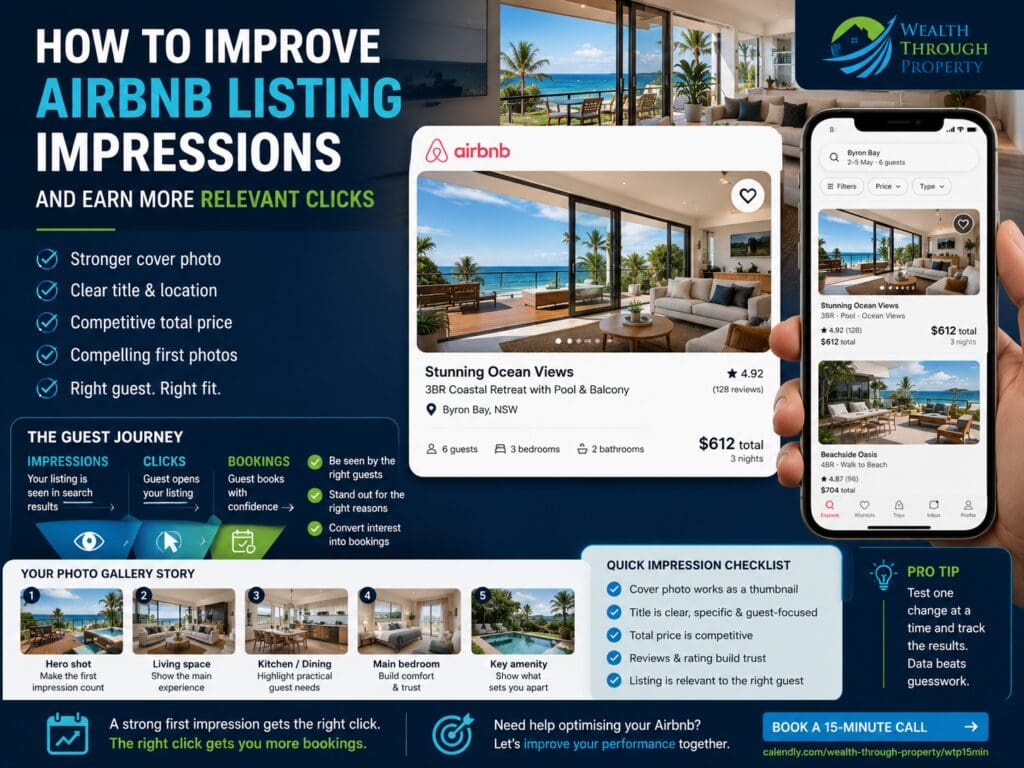
How to Improve Airbnb Listing Impressions and Earn More Relevant Clicks
By Scott Levoune, founder of Wealth Through Property · Published · Updated
An Airbnb impression means a guest has had an opportunity to see your property in search results or another part of the platform. That visibility only becomes valuable when the listing appears relevant, understandable and competitively positioned enough for the right guest to open it.
Key Takeaway
If an Airbnb listing is appearing in relevant searches but not receiving enough clicks, the problem may be its first impression rather than its overall visibility. Review the cover image, visible price, title, review strength and guest relevance together before making major pricing or listing changes.
Diagnose Before You Change
Identify which stage of the guest journey is weak before editing the listing.
1Visibility: Is the property appearing for realistic dates, guest numbers and filters?
2Click appeal: Does the search-result card make the right guest want to inspect the listing?
3Conversion: Once guests open the listing, do they continue toward a booking?
What an Airbnb Listing Impression Actually Means
An impression generally indicates that a listing has been shown to a potential guest somewhere on the platform. It does not mean the guest studied the property, opened the listing or seriously considered booking it.
A property may receive many impressions because it is eligible for a broad range of searches, but still attract few clicks if the search-result card is unclear, poorly positioned or less compelling than nearby alternatives.
An impression is an opportunity to be considered. A click is evidence that the first impression created enough interest for the guest to look further.
This distinction matters because hosts sometimes respond to low bookings by changing price immediately. Price may be part of the problem, but reducing it will not fix an unclear main photo, weak guest fit, restrictive calendar or misleading listing promise.
Understand the Guest Conversion Funnel
Airbnb performance is easier to diagnose when the guest journey is divided into stages. Each stage answers a different question and requires a different response.
ImpressionsWas the listing shown to guests searching relevant dates, locations, group sizes and features?
Listing clicksDid the cover image, price, rating and visible information earn enough interest to open the property?
BookingsDid the full gallery, description, amenities, reviews, rules and total value create enough confidence to reserve?
If impressions are low, begin with availability, minimum stays, location relevance, filters and search eligibility. If impressions are reasonable but clicks are weak, examine the search-result presentation. If clicks are healthy but bookings are weak, the problem is more likely inside the listing or booking conditions.
Owners often ask why bookings are low when the more useful question is where the guest journey is breaking down. A listing can underperform for several different reasons, and each one requires a different response.
1Low impressions: The listing may not be eligible for enough relevant searches because of blocked dates, minimum stays, guest limits, lead-time rules or weak demand.
2Good impressions, weak clicks: The cover image, title, visible price or review profile may not be competitive enough.
3Good clicks, weak bookings: Guests may lose confidence after seeing the full price, gallery, rules, amenities, reviews or sleeping setup.
4Good bookings, poor returns: The problem may be pricing, length of stay, turnover costs, discounts or calendar inefficiency rather than listing appeal.
Do not use one metric as a complete diagnosis. Impressions, clicks, bookings, revenue and guest quality should be reviewed together.
Your Cover Photo Must Work as a Small Thumbnail
The main photograph is often the strongest visual signal in the search result. It has to communicate quickly because guests may be comparing several similar properties on a small mobile screen.
The owner’s favourite photograph is not always the strongest cover image. A wide exterior may feel impressive on a desktop monitor but become confusing when reduced to a thumbnail. A detailed kitchen image may look polished but fail to explain why the stay is distinctive.
Run a mobile-thumbnail test
1One focal point: The guest should understand the main subject immediately.
2Clear benefit: Show a feature the intended guest genuinely values, such as a view, pool, living space or outdoor area.
3Good light: The image should remain readable at small size without heavy shadows or blown highlights.
4Accurate promise: The rest of the listing must support the experience suggested by the image.
5Visible difference: Compare it with nearby listings and check whether it looks materially distinct.
Avoid misleading angles, excessive editing, text-heavy graphics or images that imply an amenity, view or location experience the guest will not actually receive.
Review the Listing on Both Mobile and Desktop
A listing can look strong on a large screen and weak on a phone. Cropping, text length, image balance and visible pricing may all be presented differently depending on the device and screen size.
Review the listing as a guest rather than only from the host dashboard. Search realistic dates, enter a likely guest count and compare the listing against alternatives.
Mobile viewCheck whether the cover photo remains clear, the focal point survives the crop and the visible information is understandable at a glance.
Desktop viewCheck the gallery sequence, title, map context, total value and how the property compares across a wider search screen.
Guest search viewUse realistic filters and dates so the listing is reviewed in the same context as the intended guest.
Do not assume the host preview accurately represents the guest’s decision environment. Search results are comparative, so the listing must work beside competitors rather than in isolation.
Choose the Cover Photo for the Intended Guest
Different travellers respond to different benefits. The most effective cover image should reflect the type of stay the property is best equipped to deliver.
Family staysA pool, fenced yard, generous living space or dining area may communicate suitability more clearly than a styled bedroom.
Couples escapesViews, fireplaces, spas, balconies, privacy or atmospheric interiors may be more relevant.
Group bookingsLarge shared areas, outdoor entertaining, multiple zones or a strong destination feature may earn attention.
The image should not attempt to appeal equally to every possible guest. A clear message for the best-fit traveller is usually stronger than a generic image that communicates very little.
Match the Search Card to the Actual Guest Promise
The cover image, title and visible price should work together. If they communicate different messages, guests may hesitate or click for the wrong reason.
For example, a premium ocean-view image paired with a budget-style title may create confusion. A family-focused title paired with a romantic bedroom image may not immediately communicate why the property suits children or larger groups.
Make the search card tell one clear story.The image should show the benefit, the title should explain it and the price should make sense for the promised experience.
Clarity usually performs better than trying to communicate every possible feature at once.
Your Listing Title Should Add Information, Not Repeat the Photo
The listing title has limited space, so every word should help the guest understand the property. Avoid vague phrases that could describe almost any short-term rental.
A useful title may combine the property type, location context and one or two meaningful differentiators. The strongest differentiator depends on the intended guest and what nearby alternatives offer.
Use factual benefits instead of exaggerated claims.“Three-bedroom beach house with fenced yard” is clearer than “ultimate luxury paradise” when the practical features are what the guest is comparing.
Do not load the title with every amenity. Important supporting details belong in the gallery, amenity fields and description. The title’s job is to improve immediate understanding.
Build the Title Around Search Relevance and Guest Value
A title should help the guest understand why the property is relevant without repeating information already obvious from the photo.
1Property type: Beach house, apartment, cottage, townhouse, studio or group retreat.
2Location benefit: Walk to beach, near hospital, close to town, near event venue or central business location.
3Guest benefit: Fenced yard, pool, spa, parking, workspace, views or multiple living zones.
4Accurate wording: Avoid claims that depend on interpretation, such as “luxury”, “best” or “perfect”.
The title should remain readable and specific. It does not need to include every feature, suburb, nearby attraction and guest type at once.
Total Price Shapes the First Impression
Guests do not assess the nightly rate in isolation. Depending on the search and platform display, they may compare the total stay price, fees, discounts and value offered by similar properties.
A listing can have strong photography but still lose clicks if the visible price looks difficult to justify beside comparable alternatives. It can also appear cheap initially and become less attractive after cleaning, pet or additional-guest fees are included.
Compare like with like
1Use identical dates: Compare the same arrival, departure and booking window.
2Use the same group size: Additional-guest charges can materially change the comparison.
3Compare similar capacity: Bedroom count alone does not prove that two properties serve the same group.
4Review total value: Consider location, quality, amenities, review history and booking conditions.
Pricing should support the property’s market position rather than compensate for weak presentation. WTP’s guide to building an Airbnb pricing strategy explains how booking windows, demand and calendar controls work together.
Check for Price Friction, Not Just High Rates
A listing can appear competitively priced at first glance but still create friction later in the booking journey. Guests may react to minimum-stay requirements, cleaning fees, pet fees, additional-guest charges or strict cancellation terms.
The goal is not always to be the cheapest. The goal is for the total value to feel logical relative to the property, date, location, demand and guest experience.
Headline priceDoes the visible rate attract the right level of interest without creating a misleading value expectation?
Total stay priceDoes the final cost still compare reasonably with similar properties for the same dates and guest count?
Booking conditionsDo minimum stays, deposit expectations or cancellation terms reduce the property’s practical appeal?
When a listing receives clicks but weak bookings, total-price friction should be reviewed alongside gallery quality, amenities and trust.
The First Five Photos Should Tell a Clear Story
Once a guest begins interacting with the listing card or opens the property, the early gallery needs to confirm that the click was worthwhile. Repeating several similar angles of the same room wastes valuable attention.
The first images should answer different questions and reveal the property progressively.
1Photo one: The strongest search-result image and clearest guest benefit.
2Photo two: The main living space, view or feature that supports the cover image.
3Photo three: Kitchen, dining or another practical space important to the intended guest.
4Photo four: The main bedroom or sleeping arrangement.
5Photo five: A major amenity, outdoor zone, pool, view or distinctive experience feature.
The ideal order changes by property. A city apartment, ski stay, beach house and regional group retreat should not tell the same visual story.
Show the Practical Parts Guests Need to Confirm
Beautiful photographs earn attention, but practical photographs help guests make a decision. The gallery should answer the questions that may otherwise create hesitation.
1Sleeping arrangements: Show each bedroom clearly and explain sofa beds, bunks or shared spaces accurately.
2Bathrooms: Make the number, layout and access clear, especially for larger groups.
3Parking: Show access, driveway conditions, garage size or street-parking limitations where relevant.
4Stairs and access: Make steep paths, internal stairs or external access visible rather than leaving them as a surprise.
5Outdoor safety: Show fences, pool areas, balconies and pet spaces accurately.
Practical transparency may discourage an unsuitable booking, but it can also increase confidence for the right guest.
Professional Photography Needs Accurate Property Preparation
A professional photographer can improve lighting, composition and visual consistency, but photography cannot solve poor preparation or inaccurate presentation.
Before the shoot, remove unnecessary clutter, repair visible defects, prepare linen consistently, stage furniture for the intended guest capacity and ensure outdoor areas are usable. Photograph the property as guests will actually receive it.
Update the gallery when furniture, bedding, amenities, layout or landscaping changes. Old photographs may earn an initial click but create disappointment later if the property no longer matches the listing.
The goal is not to make the property look larger or more luxurious than it is. The goal is to make its genuine strengths easy to understand.
Use Photo Captions to Remove Booking Uncertainty
Captions are useful when the image alone cannot explain a room, layout or condition. They should clarify the photograph rather than repeat promotional language.
Identify the roomState which bedroom, bathroom, living space or outdoor area is shown.
Explain the layoutClarify whether a room is upstairs, detached, shared or accessed externally.
Disclose conditionsExplain stairs, seasonal amenities, shared facilities or access limitations where relevant.
Clear captions can help the right guest feel confident while discouraging a booking from someone whose needs the property cannot meet.
Make Sure the Amenity Fields Support the Photos
A guest may see a strong feature in the gallery but fail to find it in the amenity list, or may apply a filter that excludes the property because an amenity has not been selected correctly.
Review the amenity fields against the actual property and current setup. Do not select an amenity that is unavailable, seasonal, shared or materially restricted without explaining the conditions clearly.
1Match photos and amenities: If the gallery highlights a pool, workspace, spa, cot or fenced yard, make sure the listing fields are accurate.
2Check seasonal access: Explain when a pool, fireplace, outdoor shower or heating feature is unavailable or restricted.
3Clarify shared facilities: Guests should know whether an amenity is private, communal or subject to building rules.
4Remove outdated features: Delete amenities that are no longer offered rather than relying on the description to correct them.
Your Rating and Reviews Influence Click Appeal
Guests often assess the cover photo and price beside the rating, review count and host credibility. A well-presented listing may still struggle against alternatives that appear more trusted.
Hosts cannot manufacture trust through design alone. The property, communication, cleaning, accuracy and issue-resolution process need to support the promise made in search results.
Look for repeated review themes. If guests praise the view, location, family layout or outdoor space, consider whether the cover image and early gallery communicate that strength. If reviews repeatedly mention a limitation, ensure the listing explains it clearly before booking.
Turn Review Themes Into Better Listing Positioning
Reviews contain useful language about what guests actually value. The strongest recurring themes may reveal a better cover image, title angle or photo order.
Repeated strengthsIf guests repeatedly mention views, quietness, location or group layout, those benefits may deserve stronger placement.
Repeated confusionIf guests misunderstand access, parking or sleeping arrangements, the listing may need clearer photos and captions.
Repeated disappointmentsIf reviews mention inaccurate expectations, correct the promise rather than trying to hide the limitation.
Use review patterns as evidence, but avoid copying guest language into exaggerated marketing claims.
Check Whether You Are Comparing the Right Competitors
An Airbnb listing should be compared with properties a guest may genuinely choose instead. The nearest listing is not always the most relevant competitor.
1Location: Does it serve the same practical destination or trip purpose?
2Capacity: Does it sleep a similar number of guests in a comparable configuration?
3Quality: Are presentation, maintenance and photography at a similar level?
4Amenities: Does it offer similar parking, views, pet access, pools, spas or group facilities?
5Trust: Are the rating, reviews and host profile broadly comparable?
Review the complete search card for each relevant competitor. Note which photo they lead with, what the visible price includes and how quickly their property benefit can be understood.
Compare Across More Than One Booking Window
A listing may appear competitive for next weekend but poorly positioned for a school holiday, event period or longer lead-time search. One date comparison is not enough.
Short lead timeReview near-term weekends and gaps where guests may be making fast decisions.
Normal lead timeTest the booking window most common for the property’s destination and guest type.
Peak periodsCheck holidays, events and high-demand periods separately because pricing and competition may behave differently.
The cover image may remain effective across all dates, but pricing, minimum stays and guest expectations may need different treatment by booking window.
Calendar Rules Can Reduce Impressions Before Guests See the Listing
A listing may look strong but appear in fewer searches because its booking settings do not match common trip patterns.
1Minimum stay: A three-night minimum may exclude guests searching for a two-night weekend.
2Arrival restrictions: Limited check-in days may remove the property from otherwise suitable searches.
3Advance notice: Long notice requirements may block short-lead bookings.
4Preparation time: Large buffers between bookings may create unusable gaps.
5Closed dates: Accidental blocks or calendar-sync issues may reduce availability.
Calendar changes should still protect operations and guest experience. Do not remove essential preparation time simply to increase search exposure.
Common First-Impression Mistakes
Leading with an attractive but irrelevant image
A decorative detail, local attraction or close-up may look appealing but fail to explain the accommodation itself.
Using a dark or overly wide cover image
The main subject may disappear when the photograph is reduced to a search-result thumbnail.
Promising more than the property delivers
Heavy editing, stretched perspectives and ambiguous amenity images can attract the wrong click and weaken trust.
Showing five versions of the same room
The early gallery should answer several guest questions, not repeat one feature from slightly different angles.
Changing price before checking eligibility
A lower rate cannot help if minimum stays, blocked dates, guest limits or booking rules prevent the listing from appearing for the intended search.
Trying to appeal to everyone
A generic presentation can become less persuasive than a focused listing built around the guests the property serves best.
How to Run a Practical Impression Audit
Use realistic guest searches rather than repeatedly searching the property without dates or filters. The purpose is to see the listing in the same context as a potential guest.
1Choose a guest segment: Family, couple, group, pet-friendly traveller, event guest or longer-stay guest.
2Select realistic dates: Test a normal weekend, peak period, quiet period and suitable booking window.
3Use accurate filters: Enter the correct guest count, pets, bedrooms and important amenities.
4Capture the search result: Review the property beside relevant alternatives on mobile and desktop.
5Record the total price: Compare the full guest cost rather than the headline nightly rate.
6Score the first impression: Assess image clarity, guest fit, differentiation, trust and value.
A 30-Minute Airbnb First-Impression Audit
A quick structured review can reveal obvious issues before a full optimisation project begins.
1Five minutes — search eligibility: Test realistic dates, guest numbers and key filters to confirm the listing appears.
2Five minutes — thumbnail review: Compare the cover image with five relevant competitors on mobile.
3Five minutes — price check: Compare total stay costs for identical dates and guest numbers.
4Five minutes — first gallery: Check whether the first five photos answer different guest questions.
5Five minutes — trust review: Read recent reviews and identify repeated strengths or concerns.
6Five minutes — booking friction: Review fees, minimum stays, house rules and cancellation settings.
Finish by choosing one high-impact change rather than editing every element immediately.
Test One Major Change at a Time
Changing the cover image, title, price, minimum stay, discounts and description at the same time makes it difficult to understand what influenced the result.
Begin with the strongest evidence. If the listing appears often but receives weak engagement, test a more relevant cover image or clearer early gallery. If the visible total price is uncompetitive, review rates and fees. If clicks are healthy but bookings remain weak, inspect the listing content, trust signals and booking conditions.
Give meaningful changes enough time to be assessed across a suitable booking window. A few quiet days may not provide enough evidence, particularly in a seasonal market.
Avoid constant reactive editing.Use a written test plan, record the date of each change and assess performance in the context of demand, seasonality, availability and market conditions.
Use a Simple Testing Log
A testing log helps owners separate evidence from guesswork. It does not need to be complicated.
1Date: Record when the change was made.
2Change: Write down the exact cover image, title, price rule or calendar setting changed.
3Reason: State what evidence suggested the change was needed.
4Expected result: Note whether the goal is more impressions, more clicks, stronger bookings or better guest fit.
5Review period: Choose a meaningful period that reflects the market and booking window.
6Outcome: Record what changed and whether other factors may have influenced the result.
Do Not Treat Every Slow Period as a Photo Problem
Strong presentation cannot create demand that does not exist. Local seasonality, events, weather, new supply, economic conditions and booking lead times can all influence how many guests are searching.
A property may also appear attractive but be excluded from common trips because of minimum stays, advance-notice rules, unavailable dates or an unsuitable guest-capacity setting.
When performance is weak, review the whole funnel rather than assuming one cause. WTP’s guide for diagnosing an underperforming Airbnb can help separate visibility, pricing, conversion and operational issues.
Know When the Problem Is Demand, Not Presentation
A listing may be well presented and accurately priced but still experience weak demand. This can happen during quiet periods, after a large increase in local supply or when the destination’s normal booking window changes.
Before making major price reductions, compare current performance with similar periods and review whether guests are searching at all.
Market demandAre comparable properties also showing broad availability or reduced rates?
Booking timingCould guests be booking later or earlier than in a previous period?
Local changesHave events, access, weather patterns or competing supply changed the market?
Presentation optimisation should improve the property’s chance of being considered, but it cannot guarantee demand, occupancy or revenue.
From Impressions to Better Booking Decisions
The goal is not to attract every possible click. A misleading or poorly targeted click may still end with no booking, unsuitable guest questions or disappointed reviews.
A stronger listing attracts the right guest by presenting the property clearly, accurately and competitively. The cover image earns attention, the title adds useful context, the price feels justified and the early gallery confirms the promise.
Get Support With Airbnb Listing and Revenue Optimisation
Improving listing impressions is rarely about one photograph or one price adjustment. The best results come from reviewing guest demand, search eligibility, presentation, total price, booking rules and conversion together.
Is your Airbnb being seen but not earning enough clicks?Get support reviewing the listing presentation, guest fit, pricing position and booking funnel before making more reactive changes.
An impression generally means the listing was shown to a potential guest on the platform. It does not necessarily mean the guest opened, studied or considered booking the property.
Why am I getting impressions but not enough clicks?
The search-result card may not be communicating enough value or relevance. Review the cover photo, visible total price, title, rating, location context and how the listing compares with genuine alternatives.
What makes a strong Airbnb cover photo?
A strong cover photo has one clear focal point, remains understandable on a small screen, shows a meaningful guest benefit, differentiates the property and accurately represents the experience.
Should the exterior always be the first Airbnb photo?
No. The strongest image depends on the property and intended guest. A view, pool, living area, outdoor space or distinctive interior may communicate the stay more effectively than the exterior.
How many Airbnb photos matter most for the first impression?
The cover image is critical in search results, while the next several images should quickly confirm the main property benefits and answer different guest questions. Avoid using the early gallery for repeated angles of the same room.
Can calendar settings reduce Airbnb impressions?
Yes. Minimum stays, closed dates, advance-notice rules, preparation time and arrival restrictions can make the listing ineligible for searches that would otherwise be relevant.
Will lowering my Airbnb price increase clicks?
It may improve the value comparison in some cases, but price is only one factor. A lower rate will not solve unclear photography, weak guest fit, restrictive availability or an unconvincing listing.
Why do guests click but not book?
The listing may lose confidence after the click because of the total price, gallery, amenities, reviews, rules, cancellation terms, sleeping arrangements or a mismatch between the cover image and the actual stay.
Show 5 more questionsShow fewer questionsHow should I compare my Airbnb with competing listings?
Use the same dates, guest numbers and relevant filters. Compare properties with similar location, capacity, quality, amenities, trust and booking conditions, then review the total guest-facing price.
Should I change several listing elements at once?
Usually not. Testing one major change at a time makes it easier to understand what may have influenced engagement. Record each change and assess it across a meaningful period.
How long should I test a new Airbnb cover photo?
The appropriate period depends on demand, seasonality and the property’s booking window. Avoid judging a meaningful change from only a few quiet days or from a period that is not comparable.
Can better photos guarantee more Airbnb bookings?
No. Better photographs may improve clarity and click appeal, but bookings also depend on demand, price, availability, reviews, amenities, rules, guest fit and the overall booking experience.
When should I get professional Airbnb optimisation support?
Consider support when performance remains unclear, changes are being made reactively or the owner needs help reviewing pricing, calendar strategy, presentation and conversion as one connected system.
Related support
Services and tools that connect to this topic
Move through the selected WTP pages and open the ones that connect to the article topic.